
Car Driving City: StreetPro
BROWNE CURTIS HENRYRacing
4.7201.00 Reviews
- Version
- 3.2.4
- Installs
- 10.00M
- Age Rating
- Everyone
Screenshots
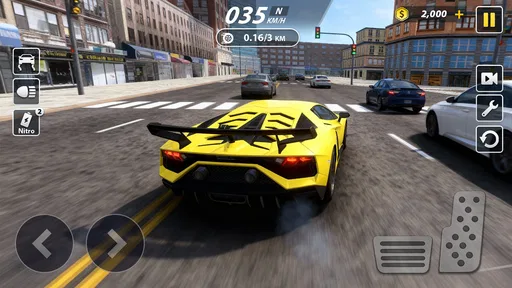
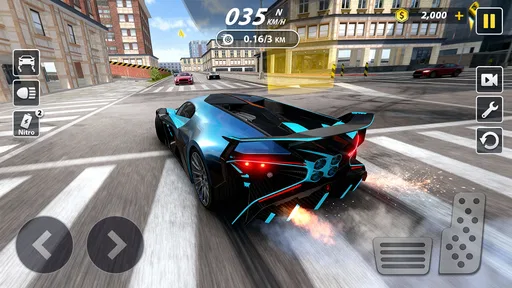
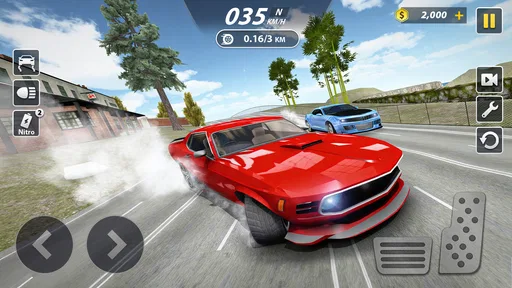
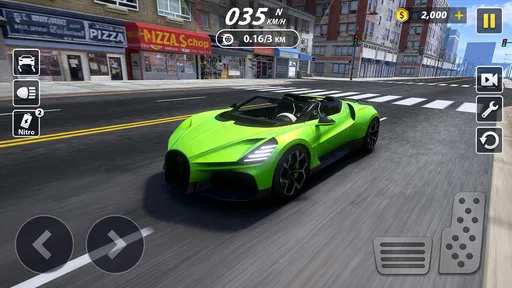
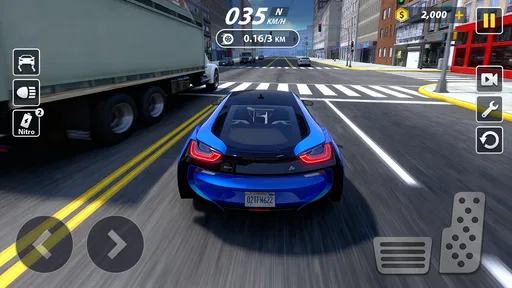
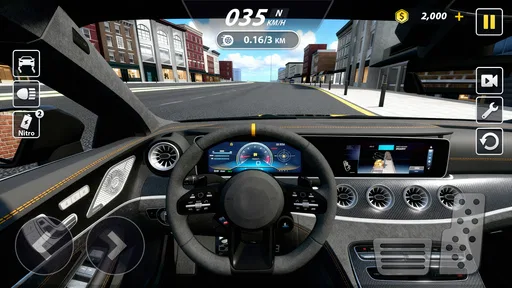
Our Review of Car Driving City: StreetPro
 Analysis by Appyee
Car Driving City: StreetPro is the kind of racing game I open when I want to drive around without committing to a formal championship or a tightly scripted challenge. It presents itself as an open-world city driving experience, and that distinction matters: the appeal is less about a single perfect lap and more about moving through an urban environment at my own pace. I found it easiest to enjoy when I treated it as a short, flexible driving session rather than expecting the depth of a dedicated console simulator.
The game is free, aimed at Everyone, and developed by BROWNE CURTIS HENRY. Its reception is encouraging, with a 4.6 average from around 20 thousand ratings and more than 5 million installs. Those figures suggest that the simple idea of driving through a city has found a broad audience, but popularity alone does not make it suitable for every player. The important question is whether its open-world style, visual presentation, and control demands fit the way you want to play.
How the city feels to navigate and read
My first impression was that the city is designed to be understood while moving, not studied like a map. Roads, buildings, and traffic spaces create a recognizable driving context, so I can usually make a decision quickly without stopping to inspect every corner. That works well for casual sessions, especially when I only have a few minutes and want to start driving immediately.
The trade-off is that open-world driving can become visually busy. A city scene naturally contains several layers at once: the road ahead, surrounding structures, turns, other vehicles, and whatever objective or direction the game places in front of me. Players with strong eyesight and quick visual processing may find this easy to absorb, while others may need slower driving and a less crowded route to keep the scene comfortable.
I recommend beginning with a cautious exploration pass rather than immediately driving as fast as possible. Staying near the edge of the road gives me more time to recognize turns and reduces the number of sudden corrections. It also makes the city easier to learn. After I understand the main routes, I can increase my speed without relying entirely on memory.
Navigation is most comfortable when I use the game as a visual driving space instead of assuming it will provide the same guidance tools as a full navigation application. If you prefer a clearly marked route, constant objective prompts, or a highly structured progression path, this may feel less direct than a traditional racing game. If you enjoy finding your own rhythm and learning a virtual city through repetition, the looser structure is part of the attraction.
Why short sessions work particularly well
One of the more useful ways to approach StreetPro is as a break between other tasks. I can play for a short period, drive a familiar stretch, and stop without feeling that I have abandoned a complicated campaign. That makes it a reasonable choice for a commute break, a quiet evening, or a quick change of pace after work.
For example, if I have ten minutes before leaving the house, I would not choose a long competitive event that demands concentration from start to finish. I would instead use this game to cruise through the city, practice a turn, or simply get comfortable with the controls. The open-world format supports that kind of stop-and-start use better than a game built around lengthy races.
There is also a practical learning benefit to repeating the same route. Rather than trying to master the entire city, I can choose one area and use it to test steering, braking, and camera awareness. This turns casual driving into a manageable routine. It is a small but valuable approach for players who become overwhelmed when a game presents too much space at once.
Controls, movement, and sensory comfort
Racing games often place more pressure on motor control than their relaxed presentation suggests. Steering requires repeated adjustments, while speed changes and camera management can compete for attention. In my experience, the most comfortable sessions came from avoiding unnecessary speed until I had a reliable feel for the vehicle. Fast driving may look exciting, but it magnifies every small mistake and can quickly become tiring.
Players who have limited precision, reduced hand strength, tremors, or difficulty coordinating several actions at once should pay attention to how demanding the driving feels in practice. A game can be easy to understand while still requiring frequent fine movements. StreetPro is therefore more approachable when played patiently, with broad turns and deliberate corrections, than when treated as a test of instant reactions.
A useful personal adjustment is to separate learning from performance. On the first few drives, I focus only on keeping the car pointed in the right direction. I do not try to set a fast pace and explore at the same time. Once steering feels predictable, I add speed gradually. This method reduces the mental load and gives players with different motor abilities a fairer chance to decide whether the controls suit them.
Sensory comfort depends heavily on the individual. An open city can provide a stronger sense of place than a plain circuit, but more visual movement can also mean more stimulation. Buildings passing quickly, road changes, and traffic activity may be enjoyable for one player and exhausting for another. I found that slower driving makes the scene easier to process and gives me more control over how much information reaches me at once.
People sensitive to motion or rapid visual changes should approach the game in brief trials. A short session is enough to discover whether the camera movement and driving pace feel comfortable. If the view becomes unpleasant, slowing down is the first sensible adjustment. The game is at its best for me when I can keep the image stable and predictable rather than constantly forcing aggressive maneuvers.
Using the game without chasing speed
It is tempting to judge a racing game only by how fast it feels, but that would miss one of StreetPro's more accessible qualities. The city setting allows me to create a gentler style of play. I can concentrate on route familiarity, smooth steering, and avoiding collisions instead of treating every street as a competition. That gives players who do not enjoy reflex-heavy racing another way to engage with the same environment.
This approach also helps younger players. The Everyone age rating makes the game suitable for a broad audience, but suitability does not mean every control will feel effortless. A child may understand the goal quickly and still benefit from an adult showing how to begin slowly, recognize turns, and recover after a mistake. The same guidance can help an older player who is new to mobile driving games.
I would not describe the game as a replacement for a purpose-built accessibility tool. Its value is more practical: the open-world format gives me room to choose a calmer pace and repeat familiar actions. That flexibility is useful, but it should not be confused with dedicated control customization or formal accessibility support.
Playing in different real-world situations
Context changes how enjoyable a driving game feels. At home with both hands available and a quiet room, I can pay attention to the road and respond more comfortably. On a crowded bus, while standing, or in a noisy waiting area, the same game demands more concentration than I may want to give it. The changing environment around me can make visual driving harder, particularly when I am already dividing attention between the screen and the real world.
For that reason, I see StreetPro as better suited to seated play than one-handed, distracted use. A player with limited mobility may find a short, controlled session more manageable than a long race, but the practical experience still depends on the device, grip, and control layout. I would test it in the exact situation where I plan to use it instead of assuming that a comfortable home session will translate perfectly to mobile play.
Screen size can also influence readability and precision. On a larger phone, the road and surrounding landmarks are easier for me to separate. On a smaller display, I need to pay more attention to the central driving area and may prefer slower routes. Players with low vision should consider whether the game's visual information remains clear on their particular device, since the same city scene can feel spacious on one screen and cramped on another.
Lighting matters as well. Reflections, bright outdoor light, or a dim room can make a driving scene less comfortable to read. I get better results when the screen is positioned to avoid glare and when I take regular pauses instead of pushing through eye strain. These are ordinary adjustments, but they make a noticeable difference in a game where visual awareness is central to the experience.
Who is likely to enjoy it
I would recommend StreetPro to players who want a free racing game with an open city to explore, especially those who prefer flexible driving over a strict sequence of events. It is a good match for someone who likes learning roads gradually, taking short breaks, and choosing a personal pace. It can also work for families looking for an Everyone-rated driving title that does not require a heavy commitment before the first session.
It is less suitable for someone searching for a highly competitive racing environment, a realistic simulator, or a carefully guided progression system. Players who need large text, strong contrast options, remappable controls, or detailed sensory settings should be cautious. I would not choose this as my first option when accessibility customization is the deciding factor, because the experience depends substantially on the player's ability to interpret the scene and manage the driving controls as presented.
It may also disappoint players who want every minute to deliver a clear achievement. Open-world driving can feel relaxing, but it can also feel directionless if I need constant objectives. A conventional track racer is a better choice when I want short, clearly defined events, obvious finish lines, and immediate performance feedback. A serious driving simulator is better when vehicle behavior and realism matter more than casual city exploration.
Where the experience still creates barriers
The biggest barrier is the combination of visual reading and motor response. Even when the city is easy to recognize, I still need to monitor the road, anticipate changes, and steer accurately. Those demands arrive together, which can make the game tiring for players who need more time to process movement or who find repeated corrections uncomfortable.
Another limitation is the uncertainty that comes with a less structured driving experience. A player who relies on explicit instructions may not know immediately what to do next or which part of the city is most useful for practice. I solved this by creating my own routine: choose a familiar road, keep the speed moderate, and use each session to improve one action. That works, but it requires initiative from the player rather than providing a ready-made accessibility path.
There is also a social and environmental barrier that has nothing to do with skill. Driving games can draw attention through movement and sound, so they are not always comfortable in shared spaces. Someone who needs a quiet, low-stimulation experience may prefer playing privately and taking breaks before fatigue builds. Likewise, players who cannot hold a phone steadily for long periods may need a stable surface or another comfortable setup.
Because the game is free, it is easy to try without a purchase decision, which lowers the risk of testing it. Still, “free” does not remove the need to check personal comfort. I would spend a few minutes examining whether the controls, visual pace, and city layout work for me before investing time in longer sessions. That small trial is more useful than assuming the broad age rating guarantees an effortless experience for everyone.
Performance, version, and everyday value
The current version is 3.2.1, and the game supports devices running Android 7.0 or later. That gives it a relatively broad technical reach for Android players, although the actual comfort of play will still depend on the phone's screen, responsiveness, and available performance. A device that handles ordinary apps well may still provide a different driving experience from a newer phone with a larger, smoother display.
I would keep the first test session simple: use a familiar route, check whether the image remains readable, and notice how much effort steering requires. If the phone becomes warm, the frame movement feels uneven, or the controls seem delayed, those issues can make driving much harder than the game itself intends. In that situation, lowering expectations and shortening sessions is sensible; if the experience remains uncomfortable, another racing format may be a better choice.
The developer, BROWNE CURTIS HENRY, has positioned this as a city-driving game rather than a narrowly focused track title. That identity gives it a clear audience. I appreciate that I can enter the world without first learning a complex racing calendar, but I also accept that the freedom comes with less guidance. The game succeeds when I want an accessible idea of urban driving, not when I need a complete simulation or a highly configurable interface.
Its strong rating and large install base make it easier to understand why people try it, but my recommendation rests more on the way it fits particular habits. The best use case is a player who enjoys exploring slowly, repeating routes, and treating the city as a playground. The weakest use case is a player who needs precise accessibility controls, constant direction, or competitive depth from every session.
An inclusive verdict for potential players
After spending time with Car Driving City: StreetPro, I see it as a welcoming idea with practical limits. The open-world city gives me more freedom than a standard lap-based racer, and the free entry makes experimentation straightforward. I especially like the option to turn a driving session into something calm and self-directed instead of forcing myself into high-speed play.
Its inclusive value comes from that flexibility, not from any promise that every player will find the controls effortless. Slowing down, repeating one route, choosing a comfortable setting, and separating exploration from speed are the most useful ways I found to make the experience more manageable. Those habits can help players with different levels of confidence, attention, and motor precision, while still leaving room for honest self-assessment.
I would recommend it to a friend who wants a casual city-driving game and is comfortable with visually guided mobile controls. I would suggest trying it carefully if screen readability, motion comfort, or hand control is a concern. If those factors work for you, StreetPro offers a pleasant way to spend short sessions behind the wheel. If they do not, a more structured racer or a game with dedicated accessibility settings will probably serve you better.
My final recommendation is simple: choose this game for flexible urban driving, but judge it by your own comfort with the screen and controls rather than by its broad audience rating. That balance captures what makes it appealing and where it still asks more from the player than its relaxed open-world concept might initially suggest.
For me, the game is most successful when I stop expecting it to be everything at once. It is not the deepest simulator or the clearest choice for players who need extensive customization. It is a free, approachable racing experience built around city driving, and within that space it can provide an enjoyable, low-pressure routine. Car Driving City: StreetPro is worth trying when exploration matters more to you than perfect realism, provided the visual and motor demands match the way you play.
Privacy and Permissions
See what permissions an app requests and how it handles your data.
- Location
- approximate location (network-based), precise location (GPS and network-based)
- Phone
- read phone status and identity
- Wi-Fi connection information
- view Wi-Fi connections
- Device ID & call information
- read phone status and identity
- Other
- view network connections, full network access, control vibration, prevent device from sleeping, Google Play license check, read Google service configuration
Verdict
Strengths of Car Driving City: StreetPro
- Responsive controls make city driving easy to learn.
- Varied traffic keeps routine routes from feeling too predictable.
- Short missions suit quick gaming sessions.
- Vehicle upgrades provide a clear sense of progression.
- Offline play is useful when a connection is unavailable.
Limitations of Car Driving City: StreetPro
- Traffic behavior can occasionally feel artificial.
- Some objectives may become repetitive after extended play.
- Higher-tier vehicles may require considerable grinding.
- Touch controls can feel cramped on smaller screens.
- Visual quality may vary between vehicles and city areas.
Similar Picks in This Category
View All
Hill Climb Racing
Fingersoft4.3

Dr. Driving
SUD Inc.4.2

Traffic Rider
skgames4.5

Asphalt 8 - Car Racing Game
Gameloft SE4.6

Race Master 3D: Car Racing
Beresnev Games4.6

Extreme Car Driving Simulator
AxesInMotion Racing4.3
Frequently Asked Questions
What is Car Driving City: StreetPro?
Car Driving City: StreetPro is a mobile driving game focused on exploring an urban environment, completing driving activities, and improving your control behind the wheel. Players can usually expect open-city roads, traffic challenges, missions, and different vehicles to handle. It is designed for casual play, but some tasks may require patience and careful driving to earn better results.
How do you play Car Driving City: StreetPro?
Gameplay generally revolves around controlling a car through city streets while following objectives such as reaching destinations, avoiding collisions, completing parking tasks, or finishing timed routes. The controls are intended for touchscreens, although the exact layout may vary by device. New players should begin slowly, learn braking and steering sensitivity, and use early missions to become familiar with the city.
Does Car Driving City: StreetPro work offline?
Car Driving City: StreetPro may allow some driving activities to be played without a constant internet connection, but availability can depend on the version, device, and specific feature being used. Online advertising, updates, cloud-related functions, or certain optional content may require connectivity. It is best to launch the game once while online and check which modes remain accessible after enabling airplane mode.
Is Car Driving City: StreetPro free to download?
The game may be available as a free download, but free access does not always mean that every feature is included without limitations. Mobile driving games commonly use advertisements, optional purchases, or unlockable vehicles and upgrades. Before downloading, review the store listing for current pricing, in-app purchase details, supported devices, and any age or privacy information provided by the developer.
What devices are compatible with Car Driving City: StreetPro?
Compatibility depends on the current Android or iOS release, operating-system requirements, available storage, and the hardware capabilities of your phone or tablet. Devices with stronger processors and sufficient memory are more likely to provide smoother graphics and fewer slowdowns in a busy city environment. Check the official app-store page before installation, especially if your device is older or has limited free space.
Play our best games!


